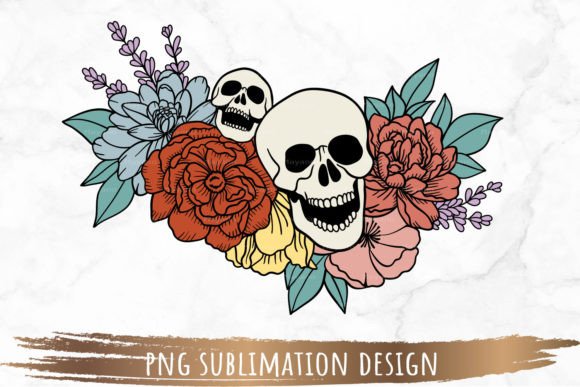
The Floral Skull PNG Sublimation Design: Integrating Digital Assets into Your Creative Workflow
For creators and entrepreneurs across disciplines, the integration of high-quality digital assets into a consistent production workflow is a foundational skill. The Floral Skull PNG Sublimation Design represents a specific type of asset engineered for this purpose. It is not merely an image; it is a prepared digital component, designed to be inserted into a larger process of creating physical goods, marketing materials, or personal projects. Understanding its specifications and how it interacts with other tools is key to leveraging it effectively.
Asset Specifications and Workflow Entry Point
The provided file is a single PNG with a resolution of 300 DPI and dimensions of 5830 by 3879 pixels. This high resolution and the transparent background are the two most critical technical features. In a practical workflow, this file serves as the raw material or input stage. Before any design editing begins, verifying that your software can handle PNG formats and that your intended print method supports the resolution is a necessary preparatory step. The large pixel dimensions mean the asset can be resized significantly without loss of detail, allowing it to fit various template sizes for mugs, t-shirts, posters, or phone cases without requiring you to source multiple versions of the same design.
Primary Use Cases and Process Integration
The Floral Skull PNG Sublimation Design fits primarily into the digital preparation phase of sublimation printing. Sublimation is a process where dye is transferred into materials like polyester or specially coated substrates using heat. Your workflow likely involves: concept selection, digital design preparation, printer setup, and the physical pressing. This PNG file sits squarely in the design preparation stage. You would import it into a design editing program—such as Photoshop, GIMP, Canva, or specialized sublimation software—position it within your product template, potentially combine it with other text or graphic elements, and then send the final composite to your printer.
Its use extends beyond sublimation, however. The transparent background makes it a versatile asset for other creative processes. Bloggers or marketers might layer it over website graphics or social media banners. Educators could incorporate it into presentation slides or instructional materials. Hobbyists might use it for digital scrapbooking or custom greeting card design. In each case, the workflow integration point is similar: the asset is brought into an ongoing project file as a ready-to-use graphical element, saving the time and technical skill required to create a similar design from scratch.
Interacting with Software and Hardware
The practical implementation of this design hinges on its compatibility with other tools. You will need a computer to unzip the downloaded file and a design program that supports PNG. This is a fundamental dependency. Within your software, you’ll manipulate the file. Common actions include resizing, rotating, or duplicating the skull design within your layout. It is crucial to maintain the resolution integrity during resizing; most professional software allows you to constrain proportions and see the effective DPI. Furthermore, your final output hardware—whether a sublimation printer, an inkjet printer for paper projects, or simply a digital export—must be calibrated to correctly interpret the colors and sharpness of the final design you create.
A key note is the color variance disclaimer. This interacts directly with your color management workflow. The colors you see on your screen are not absolute. Therefore, a best practice is to perform a test print on your chosen material before a full production run. This step integrates quality control into your process, ensuring the final product matches your expectation and avoiding wasted resources.
Organizing Digital Assets for Long-Term Efficiency
For professionals and small business owners who accumulate many such designs, how you organize and store these PNG files impacts long-term efficiency. Treating the Floral Skull PNG Sublimation Design as an individual asset, it should be logically filed within a digital library. Create a folder structure for "Sublimation Designs," "Floral Motifs," or "Skull Graphics," depending on your volume and categorization needs. Including a note about its resolution and transparent background in the filename or a companion text file can save time during future projects. When you need a floral element months later, you can quickly locate this file, recall its properties, and re-integrate it into a new workflow without re-evaluating its technical suitability.
Preparation and Adaptation Tips
Effective use involves some preparatory adaptation. First, always check the template requirements of your final product. If you are using a 10" x 8" tumbler template, calculate how the 5830 x 3879 px design needs to be scaled. Second, consider design combinations. The floral skull might be used as a central focal point, or it could be scaled down and used as a repeated border element. Your editing program allows you to experiment with these applications within the project file before committing to print. Third, for sublimation specifically, ensure your software is set to output the final design at the correct color mode and resolution for your printer and transfer paper, creating a smooth handoff from the digital design phase to the physical production phase.
Ensuring Consistency Across Projects
For businesses seeking brand consistency or hobbyists wanting a cohesive style, such a design asset can become a reusable component. Once you have successfully used the Floral Skull PNG Sublimation Design on a product line, you can replicate that application. By saving the completed project file—with the skull positioned, sized, and combined with any logos—you create a master template. This turns a one-off project into a repeatable process. The next time you need to produce a similar item, you open the template, verify no elements need updating, and proceed directly to print. This method enhances consistency, reduces decision fatigue, and streamlines production.
The fact that this listing provides a PNG file only, with no cutting files, clearly defines its role. It is for direct printing. This means it does not integrate with workflows involving vinyl cutting machines or CNC routers. Your process must be built around ink or dye transfer, not physical cutting of material. Understanding this boundary prevents misapplication and guides you to select the correct companion tools and methods.
Outcomes and Practical Value
The ultimate outcome of integrating this specific design into your workflow is the creation of a finished product bearing that artwork. The practical value lies in the time saved from not having to illustrate a complex floral skull yourself, the quality ensured by the high-resolution file, and the flexibility offered by the transparent background. For the entrepreneur, it might mean a faster turnaround on a customer order. For the marketer, it could mean a more visually striking campaign asset. For the hobbyist, it enables a personal project that looks professionally designed. The workflow—from download, to unzip, to import, to edit, to output—is a straightforward digital pipeline that, when understood, turns a standalone file into a valuable part of your creative or commercial process.
Successfully using digital assets like the Floral Skull PNG Sublimation Design is less about the asset itself and more about how you slot it into your established systems. By focusing on its technical properties, its compatibility requirements, and its position within a sequence of steps, you can move from simply owning a file to reliably producing results with it. This transforms a graphic from a static download into an active, repeatable component in your toolkit.